Webflow or WordPress: what to choose for a website development
In the wide world of website creation, developers need to be very careful when choosing the right platform. The name WordPress is still on everyone's lips, even though it was developed a long time ago. In this blog post, we discuss the pros and cons of Webflow and WordPress using real-world examples and comparisons based on user experience. We have also collected different opinions from real developers in forums who are also discussing this topic.
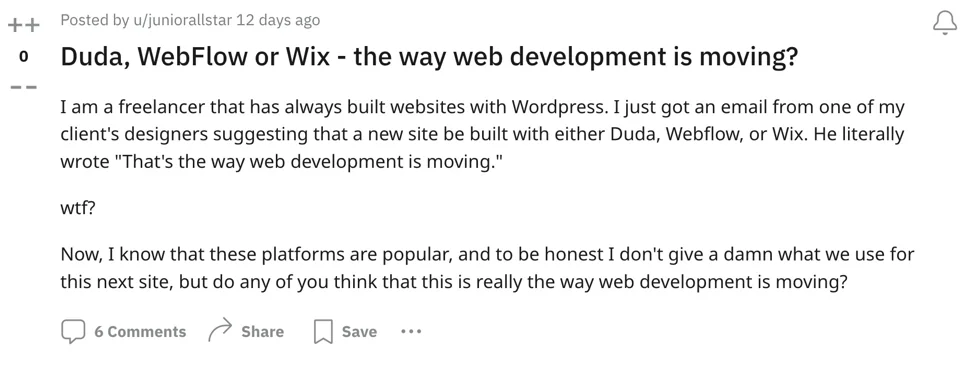
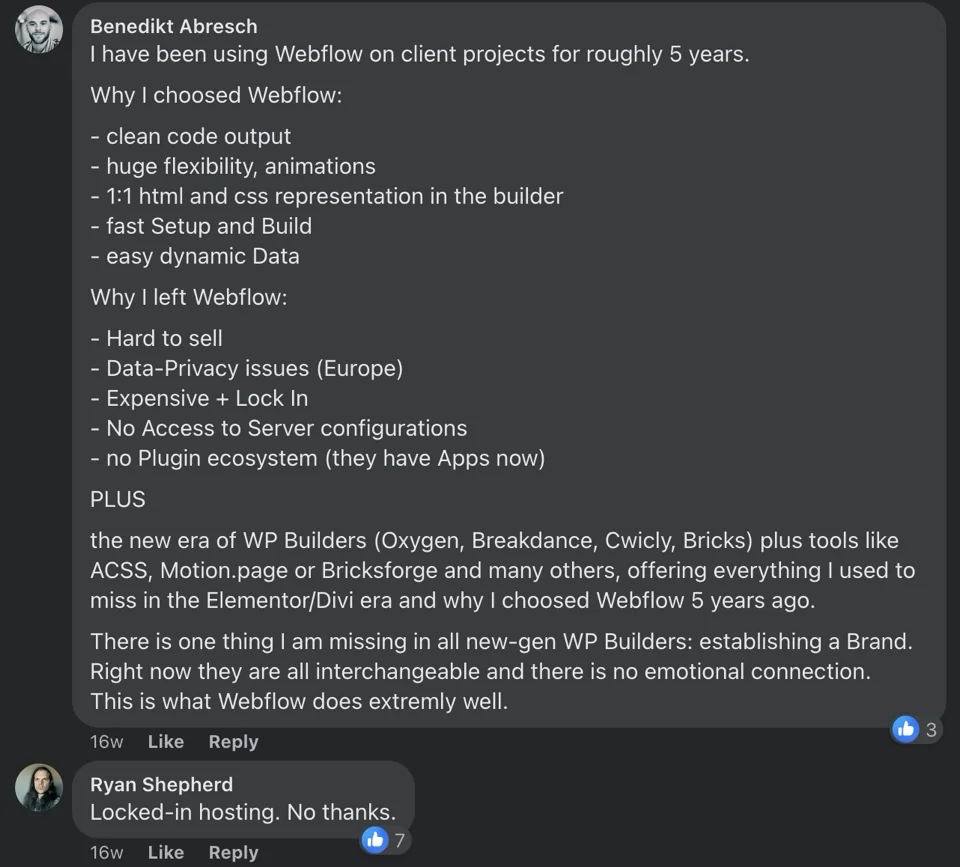
This is what Reddit users are saying:
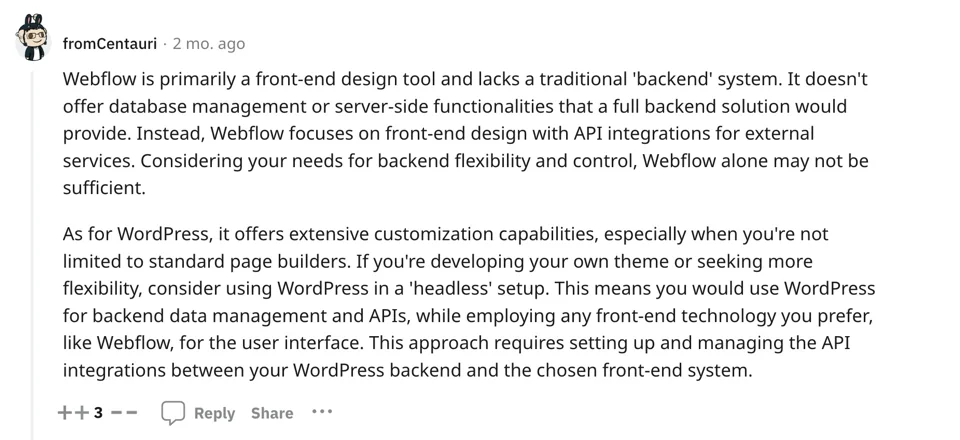
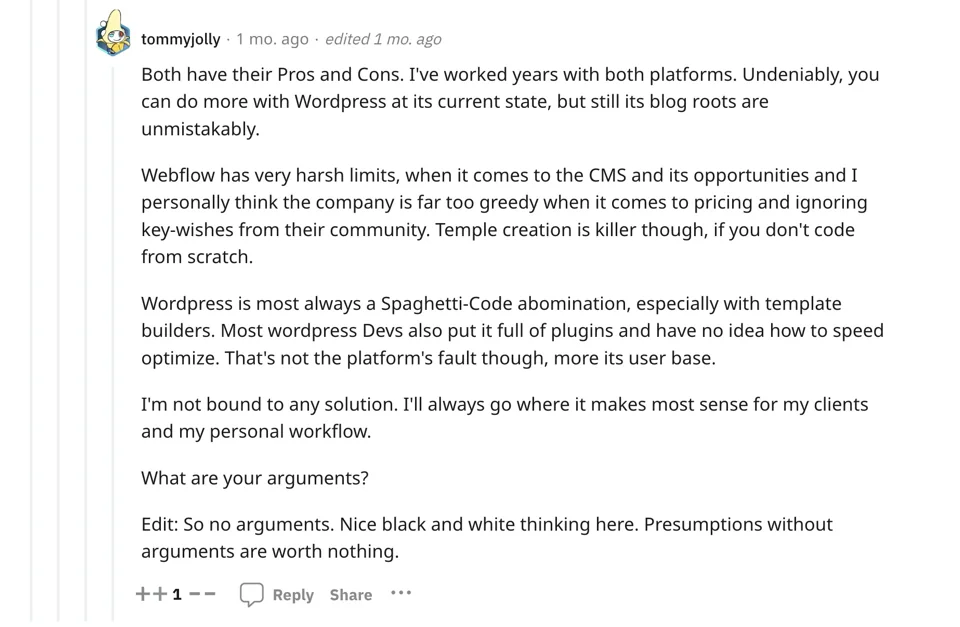
Another opinion:
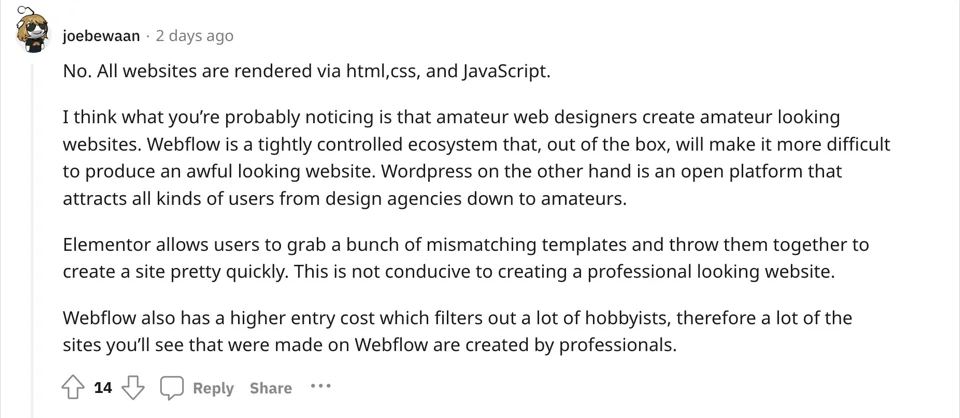
Let's take a closer look at the two tools and find their advantages and disadvantages for different scenarios.
| Aspect | Webflow | WordPress |
| Ease of Use | - Drag-and-drop interface. | - Steeper learning curve. |
| - Visual design approach. | - Customization can be challenging. | |
| Design Flexibility | - Advanced design without coding. | - Theme options; coding skills beneficial. |
| - Intricate animations and interactions. | - Customization requires HTML/CSS/PHP. | |
| E-commerce | - Integrated e-commerce with limited capabilities. | - WooCommerce plugin for online stores. |
| - 2% fee from all orders. | - Free but sometimes requires plugins. | |
| SEO Capabilities | - Built-in SEO tools. | - Plugins for SEO customization. |
| - Mediocre performance. | - Needs optimization but works faster. | |
| Hosting | - All-in-one hosting solution. | - Users choose their hosting provider. |
| - You can't change hosting. | - More control over server configurations. | |
| Third-Party Integrations | - Limited + monthly fee for apps. | - Plugin ecosystem for various needs. |
| - Challenges with specific tools. | - Wide range of third-party integrations. | |
| Community Support | - Less extensive community. | - Large and active community. |
| - Limited official support channels. | - Varied support forums and resources. | |
| Cost | - Subscription pricing is higher. | - Free, but you pay for hosting & plugins. |
| - Limited features on the free plan. | - Potential additional costs for plugins. | |
| Security | - Good security but not immune. | - Vulnerable to attacks if not updated. |
| - Relies on own hosting security. | - Management required for security. | |
| Scalability | - Suitable for smal project sizes. | - Scales well for any size of projects. |
| - Good for small-sized businesses. | - Used by enterprises. | |
| Collaboration | - Limited free collaboration features. | - Unlimited collaboration options. |
| - Challenging for large teams. | - Built-in editorial workflow and roles. | |
| Dependency | - Hosting dependency on Webflow. | - Users can choose hosting. |
| - Tied to Webflow's services. | - More flexibility in hosting options. |
The disadvantages of Webflow
The disadvantages of Webflow are that it is expensive and complicated to use. Some of the rules could be clearer, such as limiting the number of form entries you can make. If you are a creative working for clients, you need to choose the plan for an independent workspace. When you buy something online, there is an additional 2% fee on top of the PayPal strip fees. This means that even a simple online store costs a lot. But that's not all; you'll find more disadvantages below.
Technical debt and bloated CSS. One of the most frustrating aspects of Webflow is dealing with multiple global classes for items. Webflow requires the concatenation of classes instead of a basic function. This deviates from the intuitive method and contributes to bloated CSS. Chaining classes violates the basic "Don't Repeat Yourself" (DRY) principle and increases technical debt for designers and developers. This is a challenge that can impact the efficiency of design and development and requires more effort to manage and maintain the codebase.
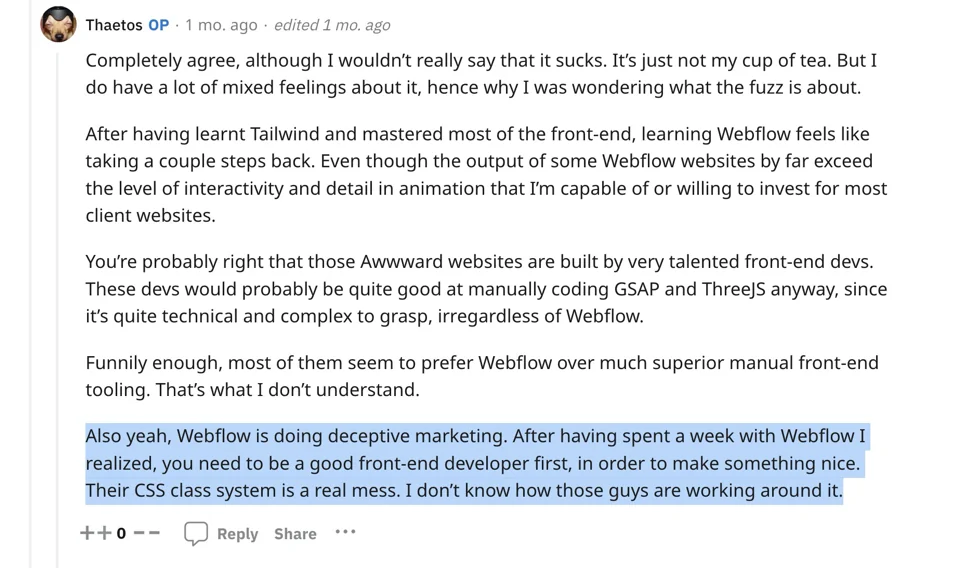
Technical debt is the accumulation of inefficient or incomplete solutions in a software project that can slow down development and jeopardize product quality.
Custom fields for extra money. A big problem with Webflow is that it costs extra for unique fields. This is another cost to think about if you need custom data models.
What other experts say about this topic:
"What you call custom fields in WP is called CMS in Webflow, and guess what? You need to have the right plan to develop and deploy a CMS for your website. Do you want to run an e-commerce store now? Sure, then you need to expand your plan accordingly. Do you want file uploads with form fields? There's a plan for that. Need more team members? You guessed it, there's another plan you need to decide on. I'm sure the team has already asked themselves these questions, but it can be frustrating to build within the plan constraints."
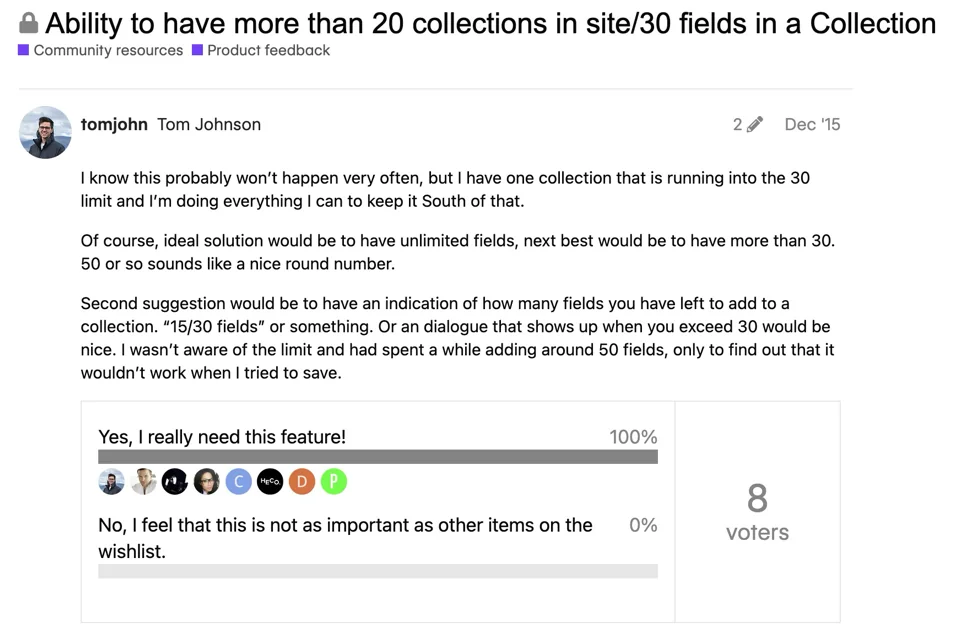
"Point blank, if the project is complex, webflow becomes a nightmare. That's the definition of Crockford's Law. Imagine being limited by the number of CPTs (collections), custom fields, the number of levels you can nest query loops in, the number of query loops you can use on a given page, and being forced to chain classes instead of adding multiple global classes to an element (which bloats CSS)— - constraints and incremental price increases abound."
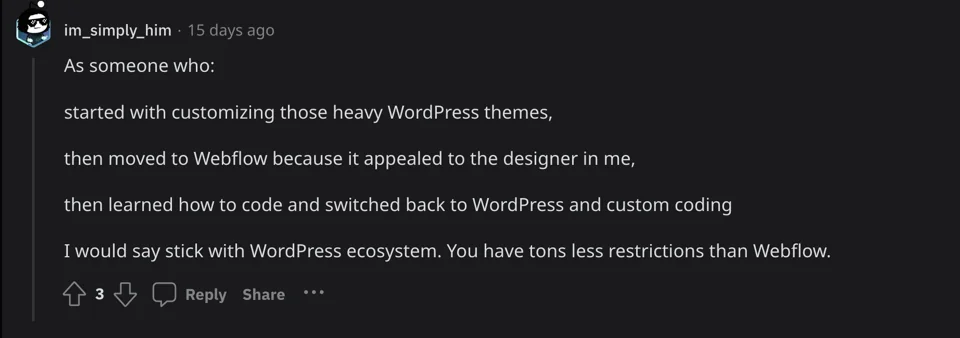
Here's another opinion from Reddit about field limiting:
Missing deep linking functionality. If someone sends you a link to an app and you click on it, the app will open on your phone and not a web browser. This is called "deep linking". Other website building tools allow you to add the necessary files to make deep linking work on iOS and Android devices. Webflow, on the other hand, prevents you from doing this.
Migration challenges. There are many problems associated with migrating from Webflow. Instead of simply exporting and zipping your websites, you have to decide how to leave the Webflow platform as you may need help to rebuild them from scratch. This inability to move quickly could be a big problem for users whose hosting needs or preferences change.
Limitations and drastic changes. Webflow's ability to change over time can add new features, but it can also make websites less stable and therefore less effective. The main problem is the question of how reliable websites created with Webflow can be in general. This lack of security in the development and updating process can be a big problem for people looking for a stable and predictable place to build websites.
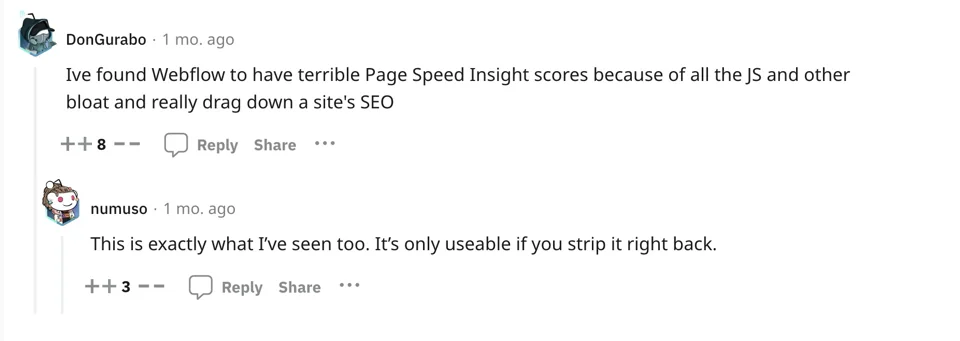
Webflow's SEO could be better. Webflow's SEO results and performance could be better than WordPress. You often get better results after leaving the platform because issues with Webflow's core JavaScript and CSS have affected key web files. There are also limitations with Webflow's SEO optimization, but hopefully the founders will improve this.
Monolithic JS and CSS core impact. Problems with Webflow's monolithic JS and CSS core impact important parts of the web. It's frustrating that these things can't be optimized to work better. Your website needs to work well and pass speed tests. Search engine optimization is also affected.
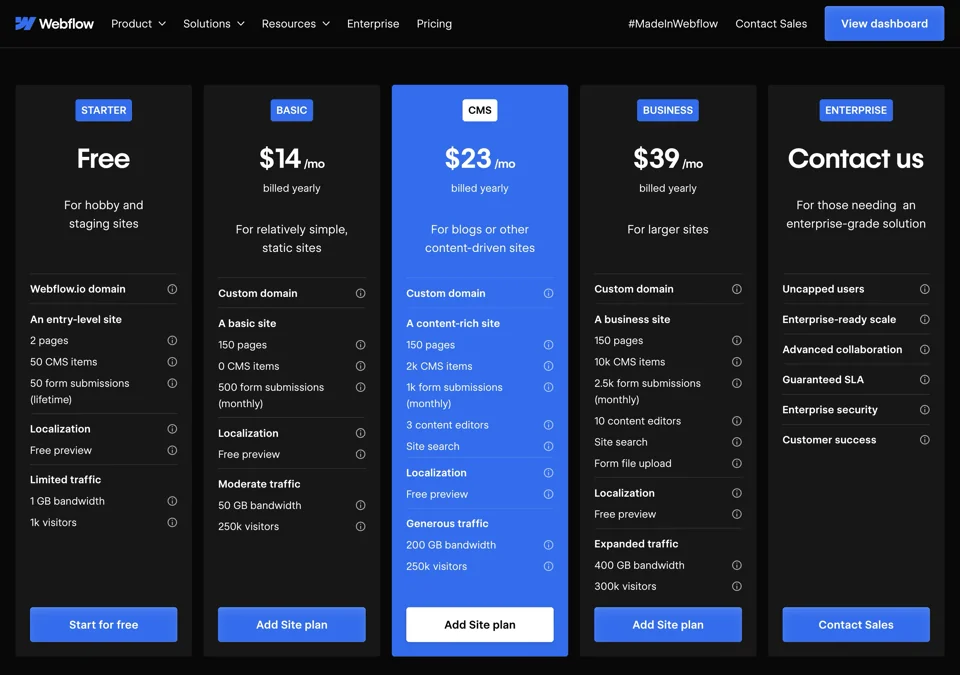
Limitations of the plan. The way Webflow sets its prices is way too greedy. Different plans require different features. With this tiered pricing system, it can be difficult to keep track of your money, and it limits the options of the plan you choose.
Restrictions for complex projects. There are restrictions on the number of collections (CPTs), user-defined fields, levels of nested query loops and the requirement to concatenate classes. These restrictions can be a significant obstacle for projects with diverse and complicated requirements.
Dependence on Webflow hosting. Websites created with Webflow are usually hosted on Webflow servers. You may feel limited in terms of hosting flexibility, and migrating away from Webflow could be a challenge. So you are building your business on the landlord's land.
Export restrictions. You want to go away? Slowly. You can export some parts of the code, but Weflow restricts what can be exported, which could change your mind. It gets tricky if you want to move your site to another hosting service or make significant changes outside of Webflow. In most cases, you will have to start from scratch with your website.
E-commerce limitations. You can do business online with Webflow, but there are limits to how big and complicated your web stores can be. Businesses that need to do a lot of e-commerce should stay away from Webflow. Or pay 2% of all your transactions based on one of Webflow's rate terms.
Third-party integration is limited. Webflow's ecosystem offers fewer third-party integrations compared to other platforms. This can limit the selection of tools and services that can be easily integrated into a website. You can use Zapier, but keep in mind that this will also increase the monthly maintenance costs for your project.
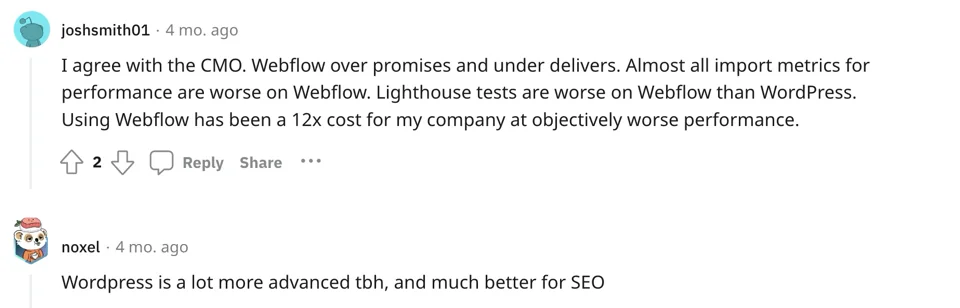
Speed and performance issues. Webflow has issues with project speed and performance. Almost all performance metrics are worse with Webflow than with WP. Below are the complaints from Reddit users.
Webflow's advantages
On the other hand, Webflow is a versatile web design and development tool that offers a number of benefits to users. Below are some of the key advantages of using Webflow.
No coding required. Webflow's visual interface allows users to design and create websites without extensive coding knowledge. This makes it accessible to designers and entrepreneurs who have no programming knowledge.
Responsive design. With Webflow, users can easily create responsive designs. With the ability to customize layouts for different devices and screen sizes, designers can ensure a seamless user experience on desktops, tablets and mobile devices.
Interactive animations. The platform provides robust tools for creating interactive animations and transitions without relying on third-party plugins. This allows designers to bring their websites to life with engaging and dynamic elements.
Hosting included. Webflow offers hosting services as part of its platform, so users do not need to find external hosting solutions. This integrated hosting feature streamlines the deployment process for websites created with Webflow.
Collaboration features. Webflow includes collaboration tools that facilitate teamwork on web design projects. Multiple team members can work on a project simultaneously, and designers can easily share and receive feedback.
Template Marketplace. Webflow offers a marketplace where users can find and purchase ready-made templates. This speeds up the design process and provides inspiration and guidance for those new to web design.
Regular updates and improvements. Webflow is constantly updating its platform and introducing new features and improvements. This commitment to continuous development ensures that users have access to the latest tools and features for their web projects.
Rapid prototyping. Webflow's visual design features and rapid prototyping capabilities allow designers to iterate and test ideas quickly. This can be particularly beneficial in the early stages of a project.
Integration with design tools. Webflow integrates seamlessly with popular design tools such as Sketch and Figma. Designers can import their designs directly into Webflow, simplifying the transition from the design phase to actual implementation.
While Webflow excels at providing a user-friendly environment with web design options, it's important to understand the financial implications of upgrading. You should be aware of the tiered pricing system that requires upgrades for advanced features and may incur additional fees as your projects or business needs grow. When evaluating Webflow, you should compare the benefits with the corresponding payment requirements to find a financially viable and sustainable long-term solution.
The disadvantages of WordPress
WordPress also has its downsides. Let us show you these in detail.
Complexity for beginners. The extensive features of WordPress can be overwhelming for newbies. The learning curve can be steeper for users with limited technical experience, especially when it comes to managing themes, plugins and settings. It takes at least 2-3 years to become an experienced developer and understand what's going on under the hood.
Security concerns. Because WordPress is a widely used platform, it can be a target for security threats. Users need to actively manage and update plugins, themes and the core software to avoid security vulnerabilities.
Customization limitations without coding. While WordPress is user-friendly, extensive customization often requires coding knowledge. Users may be limited and need help customizing certain design elements without using their own code.
Plugin quality and compatibility. The extensive plugin ecosystem contributes to functionality, but quality can vary. There may be incompatibilities between plugins or new WordPress updates, resulting in website malfunctions.
Performance concerns. Heavy reliance on plugins and themes, especially poorly optimized ones, can affect website performance. Slow loading times can affect user experience and SEO ranking. However, it should be mentioned that you can avoid this by programming a customized theme.
Constant updates. While updates are important for security and performance, frequent core updates and updates for themes and plugins can be time-consuming and occasionally lead to compatibility issues. When you update your CMS core, you may experience numerous issues.
Resource intensive. WordPress can be resource-intensive, especially for large websites or those with high traffic. Users may require high-quality hosting and performance optimization to ensure speed and reliability.
Inconsistent quality of themes. The quality of themes can vary greatly. Free themes may need more advanced features and support, while premium themes can be very expensive. Users need to choose themes carefully according to their needs. But it's up to you if you plan to use a ready-made theme. We have never used them as we create all our websites from scratch.
Cluttered interface. WordPress has a wide range of features. If you only need the basic functions, you may find yourself struggling with unnecessary features or a cluttered interface.
Dependence on third-party developers. WordPress websites are often dependent on third-party developers who create plugins and themes. If the developers stop providing support or updates, this can lead to problems with website maintenance and security.
Database bloat. Over time, WordPress can accumulate unnecessary data in MySQL tables, leading to database bloat. This can affect website performance and make it difficult to manage content efficiently.
Yes, WordPress has many issues at first glance, but many of the issues mentioned above can be mitigated with careful planning, regular maintenance and a good understanding of the platform's capabilities and limitations. Therefore, you may need our professional web development services.
WordPres' advantages
Open source advantage. WordPress is an open source platform that relies on a large developer community to drive growth. This allows for continuous improvements, security upgrades and innovation. You can literally do anything with WordPress.
Custom fields and relationships. WordPress overcomes the limitations that certain other systems impose. Unlike Webflow, which restricts the number of custom fields and post type links, WordPress gives developers the ability to remove such restrictions. You can arrange your data and links as needed to meet project requirements.
Freedom in hosting. With WordPress, you are not tied down. You can switch servers at any time, so the platform has no influence on your hosting options. You can host your website yourself on your server, so you have full control over your data.
Freedom in the backend. In addition, you can customize the backend of WordPress so that you have complete control over the inner workings of your website.
Price stability. WordPress is built for affordability. Unlike other platforms that raise their prices as they grow, WordPress remains affordable, making it an attractive option for businesses of all sizes.
Unlimited custom code. While cloud website builders limit the amount of custom code you use, there are no such restrictions with WordPress. With an unlimited number of characters for custom code, developers can create unique and complicated solutions.
To summarize, WordPress does not:
- Limit the number of custom fields (Webflow limits the number of fields to ~30 per collection in the lowest paid tier);
- Limit the number of relationships between post types (Webflow limits to ~5 multi-reference field relationships per collection);
- Stop you from moving servers at will;
- Increase the price;
- Prevent you from modifying the backend, or prevent you from moving servers at will.
ID-level styling. WordPress is characterized by its versatility in frameworks and custom themes. Unlike Webflow, which requires the generation of classes for styling, WordPress allows developers to make changes at the ID level, avoiding unnecessary clutter in stylesheets. The lack of forced nesting of classes improves efficiency, especially when using utility class systems.
Empowerment of developers. WordPress views the CMS as an essential component of the development process that enables smooth data processing. In contrast, other systems such as Webflow or Wix view CMS as an afterthought — an add-on function. The result is a more natural and integrated approach to content management.
Plugin library. WordPress has an extensive plugin library with numerous functions and solutions. This allows you to easily integrate third-party solutions and expand the potential of your website.
Content management and blogging. WordPress was originally developed as a content management system (CMS) and manages content effectively. This is especially beneficial for websites that focus on content creation and blogging.
Systematic taxonomies. WordPress has powerful taxonomy features that allow you to systematically organize and classify information.
Scale custom themes. An experienced developer can create custom themes that enhance the user experience while scaling effectively. Keep in mind, however, that poor choices, such as using many plugins, Elementor/Divi /WP Bakery and other bloated page builders, can lead to unsatisfactory performance.
Full SEO control. WordPress' SEO-friendly structure includes clean URLs, customizable meta tags and SEO plugins for further optimization. It handles SEO more efficiently than Cloud Builder. If you need assistance with SEO promotion of your business, let us know!
Advanced solutions. WordPress offers developers looking for sophisticated solutions the opportunity to create headless sites using frameworks such as Atlas or Gatsby, which are powered by React. This allows for a more dynamic and engaging user experience and pushes the boundaries of what WordPress can do.
Even NASA relies on WordPress for its online presence. A major institution like NASA has chosen WordPress, which speaks volumes about its reliability, security and capabilities.
Last but not least, you can use frameworks like Tailwind / ACSS + custom-build theme based on Bricks or Pinegrow. Wordpress does not:
- Stop you from editing at the ID level. Webflow forces the creation of classes for any styling and bloats the stylesheets.
- Force the nesting of classes and bloating stylesheets. Try using an auxiliary class system in Webflow. You will be surprised.
- Limit the amount of custom code. Webflow is limited to 10k characters.
But if you are using Elementor/Divi or another bloated page builder, please do not make this mistake. Otherwise you will have to rebuild your website, which is very likely.
Avoid a bloated builder in WordPress
Even though builders like Elementor, Divi and WPBakery have their merits, creating a custom theme for WordPress offers numerous advantages for developers and website owners. Here are more reasons why you should choose a theme created from scratch over using these builders:
- Lean code. With custom themes, you can create lean and optimized code that is tailored to the needs of the website. This leads to faster loading times and better overall performance.
- Minimized bloat. Builders like Divi can include features and elements that a particular website does not need, leading to unnecessary bloat. Custom themes contain only the essentials, reducing the overall weight of the website.
- Unique design identity. Custom themes offer complete creative freedom, allowing designers to create a unique, personalized design that perfectly aligns with the brand identity.
- No restrictions from templates. Unlike builders with predefined templates, a custom theme allows designers to create layouts and structures that match the exact vision of the website.
- Security and code quality. Custom themes are less prone to security vulnerabilities because they contain only the necessary code, providing fewer points of attack for malicious attacks.
- Clean and maintainable code. You have complete control over the codebase, ensuring compliance with coding standards and creating a more maintainable and scalable solution.
- Optimized responsiveness. Custom themes allow you to fine-tune the responsiveness of the website for different devices and screen sizes. This level of control is crucial for an optimal user experience across different platforms.
- Compatibility with developer tools. Custom themes let you choose your favorite tools and workflows to improve productivity and collaboration.
- Integration with version control. Seamlessly integrate custom themes with version control systems for better code management and collaboration between development teams.
- Customized functionality. Custom themes can be customized with specific features that ensure the website's functionality is tailored to the user's exact needs.
- No unnecessary features. Builders like Elementor often include a variety of features that can be optional. Custom themes eliminate this problem and provide a streamlined and focused solution.
- Easy maintenance. With a custom theme, updates and maintenance are easier as there are no conflicts with builder updates or compatibility issues.
- Custom documentation. You can create specialized documentation for the custom theme, making future updates and changes easier.
- Scalability without limitations. Custom themes can be designed to efficiently adapt to website growth. You can optimize the theme for performance and add features as needed without being restricted by builder limitations.
Here's what Elementor's bloated code looks like. The conclusions are obvious:
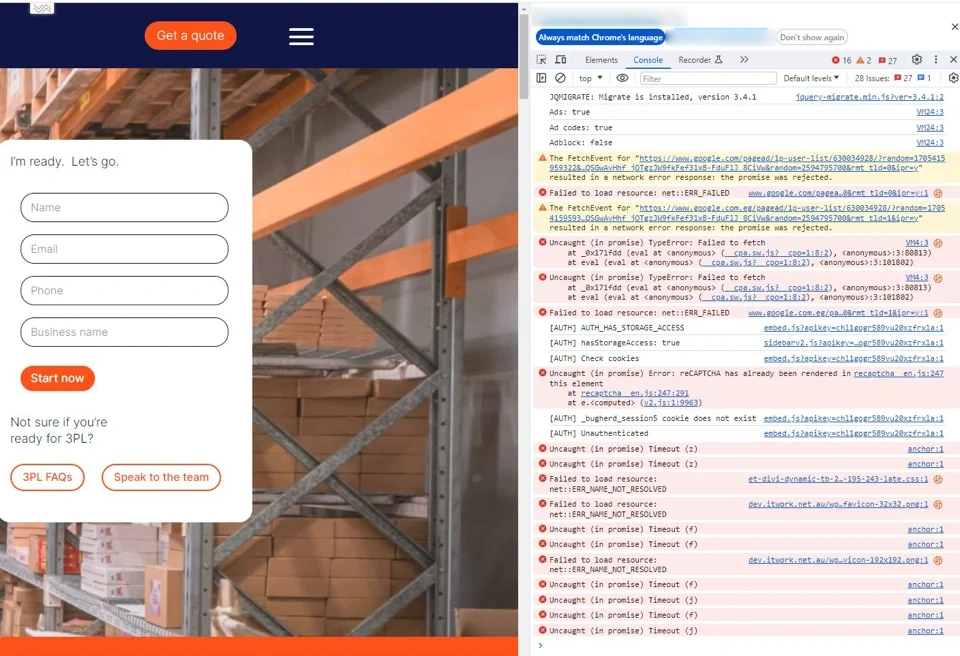
While builders are convenient, a custom theme offers a tailored, powerful solution with complete creative freedom and control over security.
Concluding thoughts
Webflow is great if you just need a simple B2B website with basic functionality. There's no denying that WordPress is the better tool if you need a robust content management system (CMS), additional features like user dashboards, built-in CRM-like features like sending a form to an email address other than the administrator's, more space for content creators and authors, overall software flexibility, and so on.
We also found this opinion on Reddit:
"I recently migrated about 30 PPC sites from Webflow because Google keeps categorizing new sites as spam and it's causing performance issues. I can build twice as fast in Bricks as I can in Webflow because I'm using SASS and all the power of CSS. Webflow is very, very limited. Look at the client-first approach to create spacing and total deception. Webflow is for graphical websites and animations. If you need more dynamic data or custom elements, you're stuck with it because it's a pain to transfer those sites to WordPress. Motion.Page and Bricks would be a better choice for any website that needs animations and the ability to expand later."
While Webflow's simplicity may appeal to certain users, WordPress is a robust, scalable and highly configurable option that gives users more control, ownership and opportunities for growth. And you can not run your business on rented land. With Webflow, you are locked into one platform and one ecosystem.
Let's take a look at the data (W3techs Data Source):
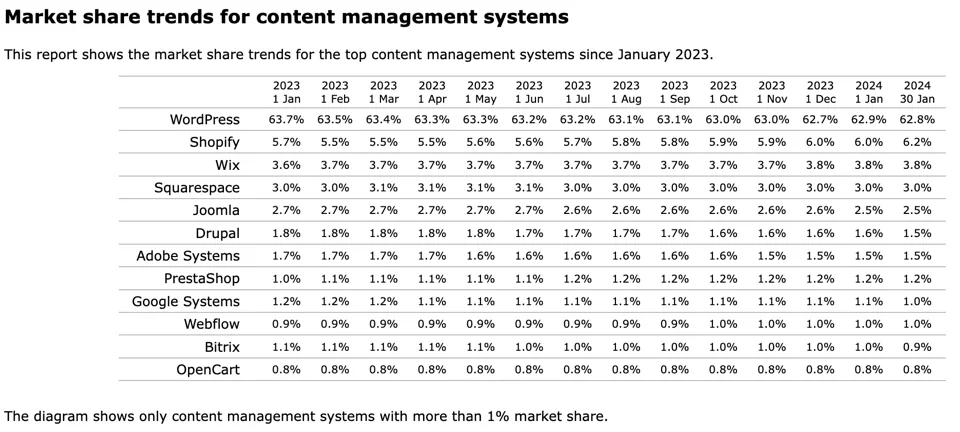
As you can see, 62.8% of all websites worldwide use WordPress and only 1.0% use Webflow. And for good reason.
The main problem that cloud web builders solve is not the problems of businesses, but the problem of web designers to find an experienced developer. These justifications come from designers trying to convince clients to get rid of developers and build websites themselves with fancy animations and design stuff instead of functionality, fast loading speed and SEO benefits that businesses need.
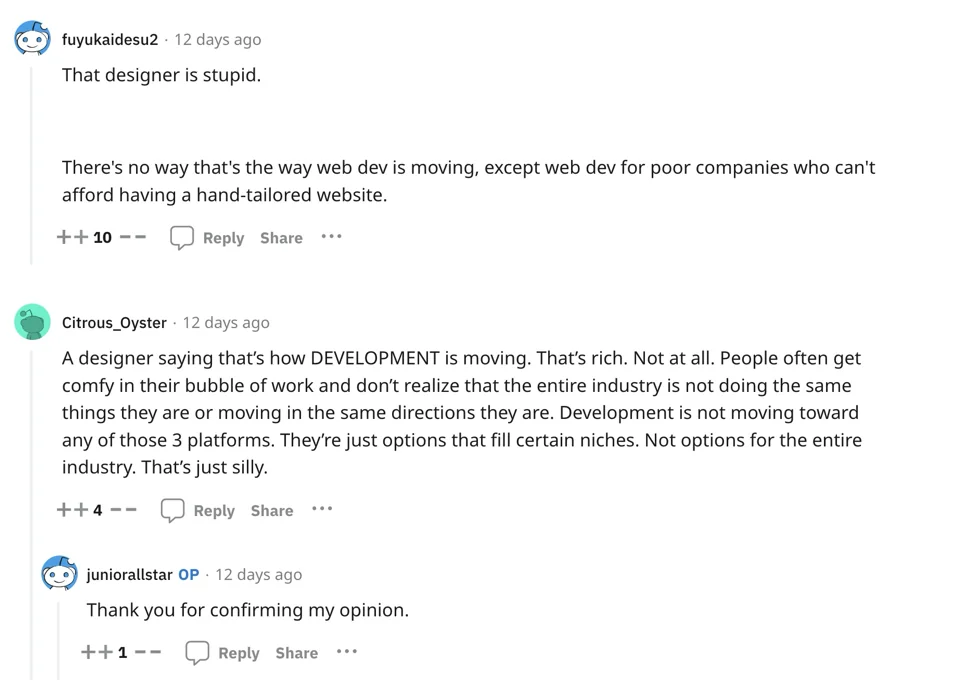
And another opinion:
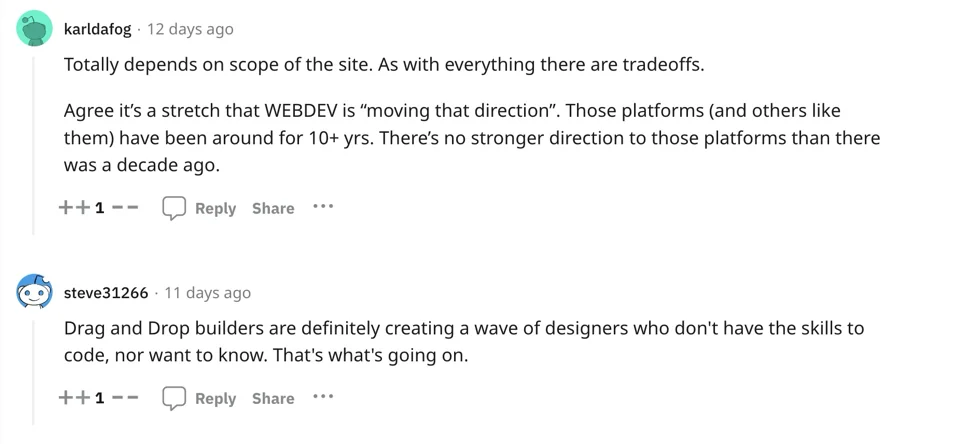
Webflow is suitable for smaller websites with a few CMS elements. But if you have a more complicated website with numerous collections (your CMS) and collection elements with multiple references, working with the API, CMS and e-commerce is a pain.
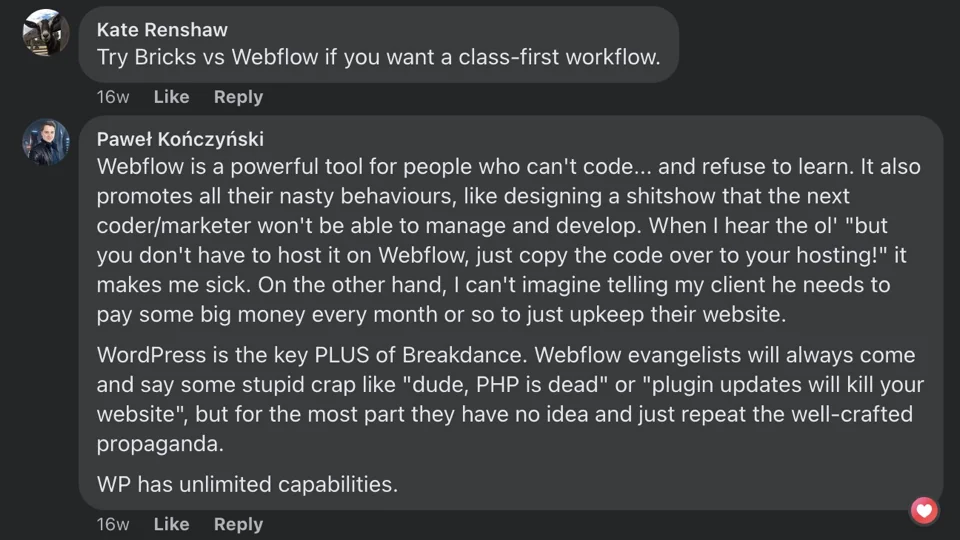
The capabilities of WordPress are obvious; its ultimate success depends on the developers who use it. With the right skills, WordPress can change the game, offering unparalleled flexibility, scalability and creative freedom. WordPress continues to be a guarantor of reliability that developers and institutions rely on in the ever-changing world of web development. If you are weighing a move off Webflow, see how we handle custom WordPress development and platform migrations on Bricks.